
Banana Cat level 1 walkthrough: clear all 34 objects
Room 1 has 34 breakable objects and four cats: three Paw Cats and one Didi. Clear both totals to finish. The route below divides the room into four object groups so it is easier to spot what remains. Change direction whenever an attack blocks your path; this is a suggested sweep, not a fixed safe route.
These growth milestones assume a fresh adventure. If you are continuing or replaying with existing progress, your weapon and growth level may already be higher.
Follow the highlighted area in each picture. The arrows suggest a route around furniture; leave it whenever an attack warning blocks the way. The object groups contain 10, 8, 8 and 8 targets. Object milestones count breakables from anywhere in the room, but time or earlier cats being defeated can also bring in reinforcements. The frames show example moments rather than a fixed enemy schedule. Following the whole groups in this order gives 10 → 18 → 26 → 34, while shots into other groups can change those group-end totals.
1. Start at the bottom and break two nearby objects
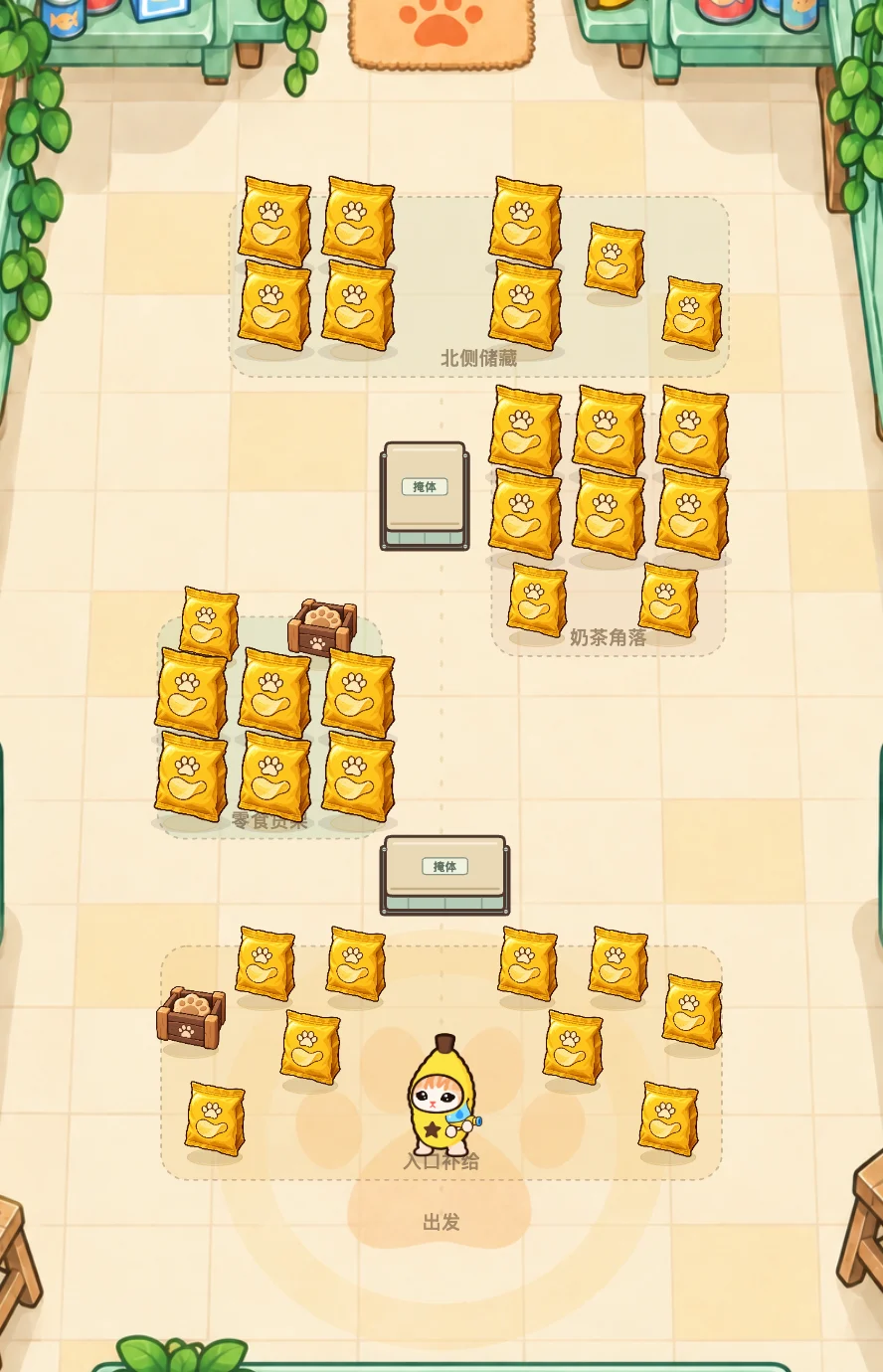
Open Play Banana Cat, then choose Start playing. Banana Cat begins near the bottom of the room with the Teardrop Pistol. The lower group contains six objects in front of you and four more near the lower edges. Aim at the nearby breakables while moving; avoid walking straight into an approaching cat.
Destroying your first two objects unlocks the Banana Blaster and raises shared firepower. Coins are credited when an object breaks, so you do not need to collect the flying coin animation. The first Paw Cat starts entering immediately. Step out of its red warning circle before the swipe lands. After the first five seconds of active play, the second Paw Cat can become eligible when eight objects are destroyed, the first cat is defeated, or the room clock reaches eight seconds.
2. Clear the left group and watch the 18-object milestone
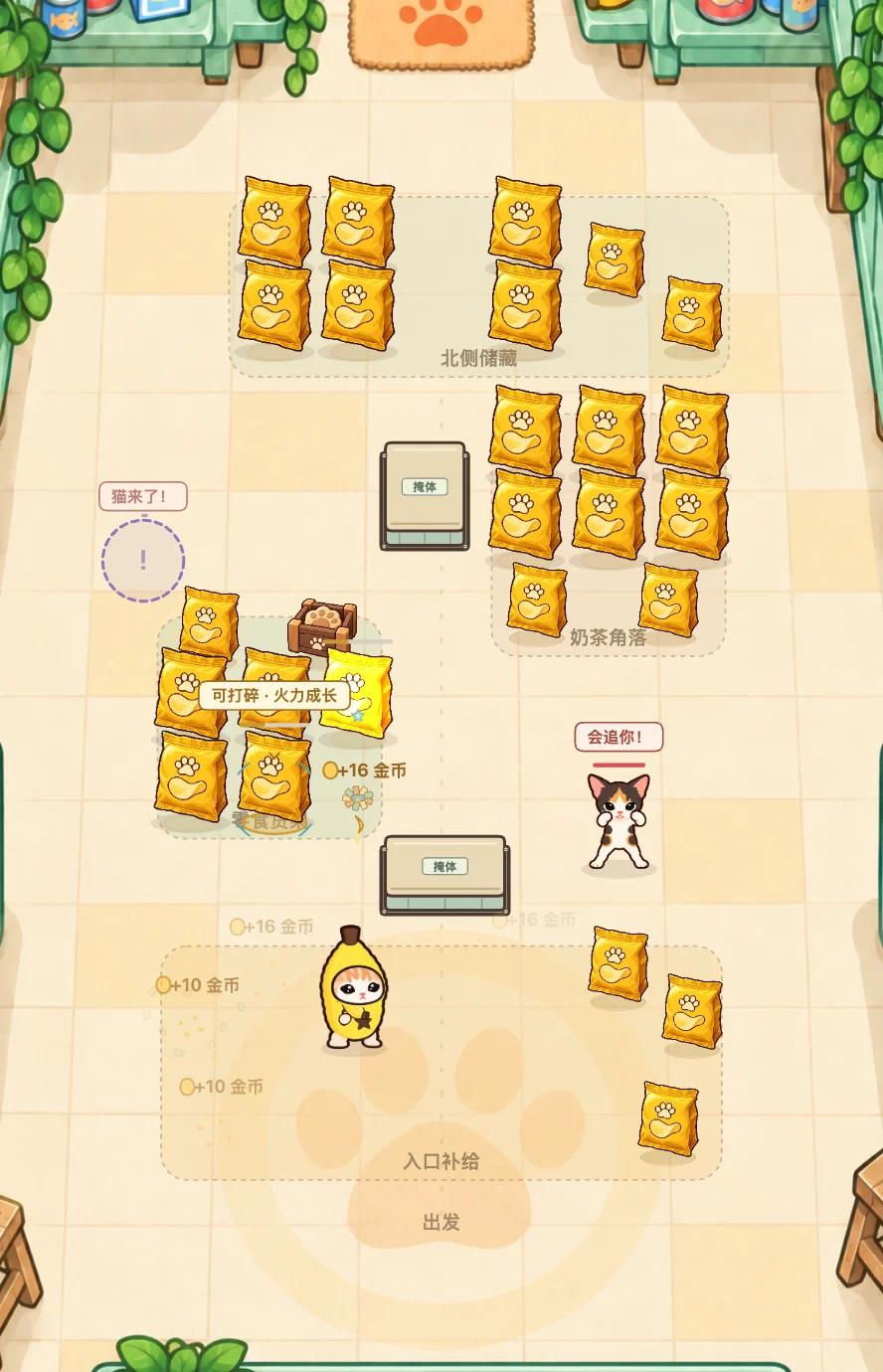
After the ten lower objects, work toward the left-middle group: six objects in two rows, plus two smaller breakables above them. Finishing these brings the object counter to 18/34 if you followed this order. Keep a route around the lower counter instead of trying to walk or shoot through it.
At eighteen destroyed objects, a fresh adventure unlocks the Popcorn Shotgun. After the opening five seconds, this object milestone can also allow Didi to enter; Didi may become eligible earlier when both preceding cats are defeated or the room clock reaches eighteen seconds. Watch for the open gap in its ring of shots and move toward that gap early. Do not stand still to keep every shotgun pellet on target while a warning is active.
3. Cross to the right group without losing your escape space
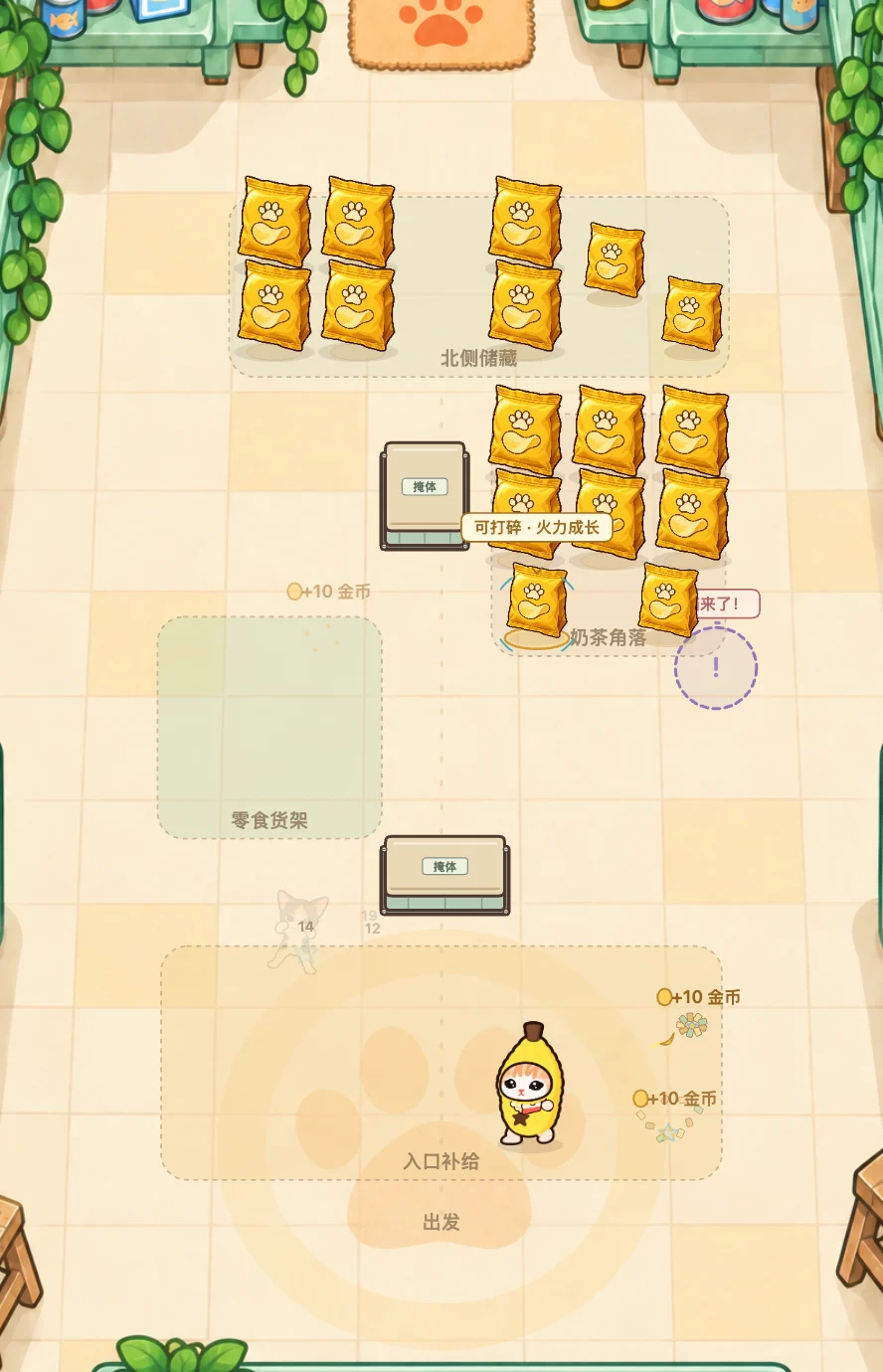
The right-middle group has another six objects in two rows and two smaller breakables below them. Clearing it after the lower and left groups brings the counter to 26/34. After the opening five seconds, this milestone can make the final Paw Cat eligible; defeating all three preceding cats or reaching twenty-eight seconds of active play can also do so. Take a clear route around the furniture and keep checking the cats while you aim at objects.
4. Sweep the top group, then check both counters
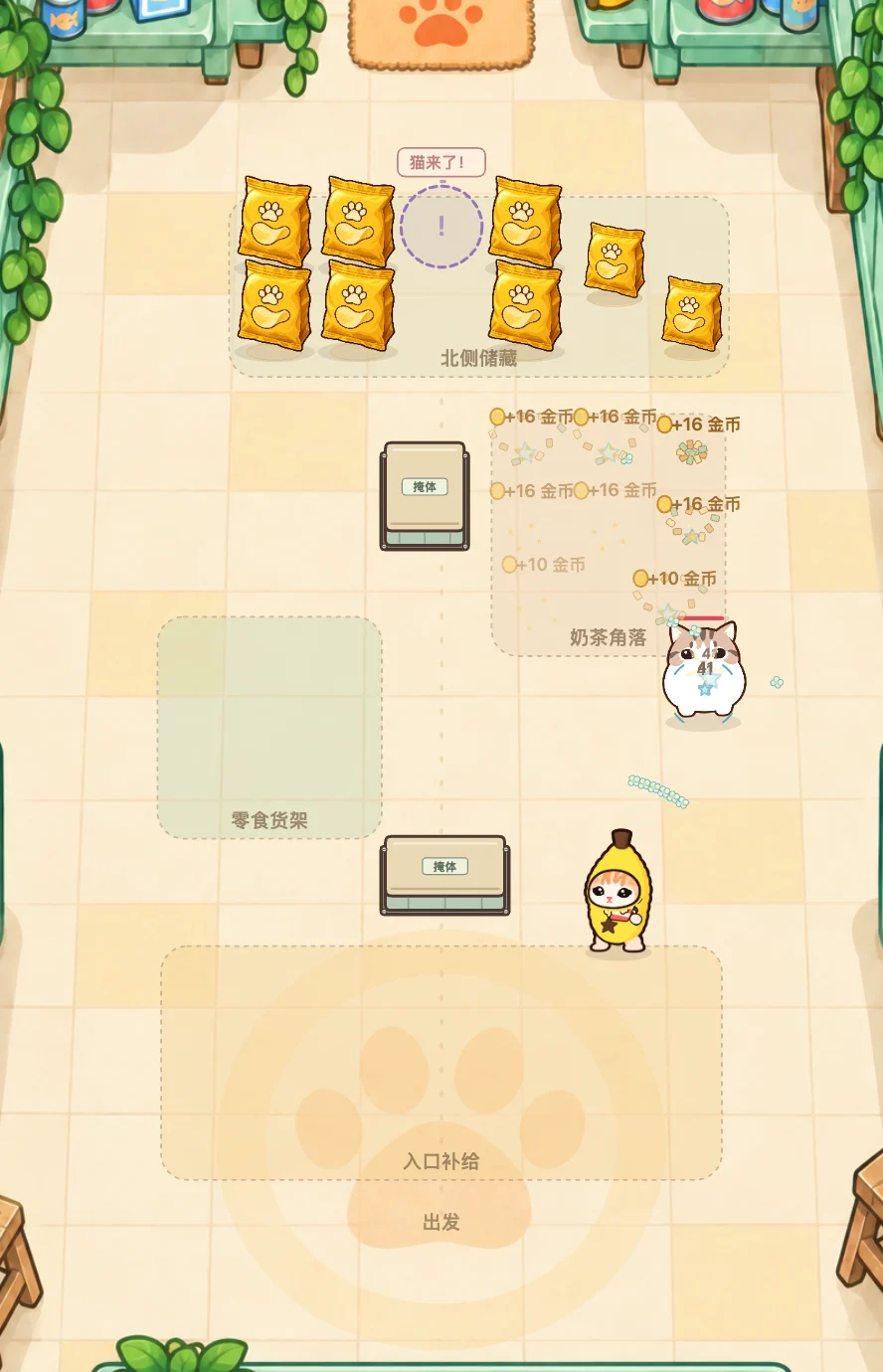
The top group contains the remaining eight breakables. After clearing it, check for 物件 34/34 and 击退 4/4. Furniture marked as cover is permanent; it does not count among the 34 objects. If the room stays open, finish the surviving cats or look for an overlooked breakable near an edge. See room-clear troubleshooting for the same problem in later rooms.
Use the result menu to continue to room 2. The Snack Supply chapter guide shows what follows in rooms 2–5.
Why has the next cat not appeared?
The roster is Paw Cat, Paw Cat, Didi, Paw Cat. The first cat starts entering immediately. Reinforcements cannot become eligible during the first five seconds of active play. After that, each later cat can qualify through any one of three conditions: its object milestone (8 → 18 → 26 destroyed objects), every cat before it being defeated, or its room-clock milestone (8 → 18 → 28 seconds). These are eligibility conditions, not exact appearance times.
You do not have to break more objects to trigger every later cat: active battle time or defeating preceding cats can also do it. At most two cats can be on the field at once, including an appearing cat, so an eligible cat may wait for space and the entry interval. Pausing stops the battle clock. Spawn positions can change if you are too close, so follow the warning marker instead of expecting a cat at a fixed spot. See the attack reference for how to react.
Banana Cat keyboard and mouse controls
- Move: WASD or arrow keys.
- Aim and shoot: point with the mouse and hold the left mouse button on the battlefield.
- Original six weapons: number keys 1–6, in Arsenal order.
- Additional six weapons: Shift+1–6, after each weapon is unlocked.
- Next unlocked weapon: use the on-screen cycle button, marked 换枪.
- Pause: press Esc or use the pause button. Choose Continue in the menu to resume.
- Cry Burst: press E when the skill is unlocked, charged and off cooldown.
Keyboard shortcuts act during an active fight. If movement does not respond, first choose Continue and click inside the battlefield to give it focus. After switching weapons, release and press fire again. Choosing a locked slot does not unlock it; check the weapon unlock guide for its requirement.
Mobile controls and auto-aim
Use the left stick to move and hold the right fire button for assisted shooting. Auto-aim checks nearby shootable hearts first, then nearby rolling citrus, available enemies and breakable objects.
A target must be in weapon range and visible around furniture. Auto-aim briefly keeps a cat selected to avoid rapid switching when two cats cross. An enemy that is still arriving or transitioning is not yet a normal shootable target.
- Shots hit furniture: move around its edge until the target has a clear line to you.
- The gun chooses a cat instead of an object: that is the normal priority. Defeat the immediate threat, or touch the battlefield directly to aim manually.
- The gun follows a heart: shootable hearts take priority at close range because they can slow you. See the enemy guide for the shy cat.
- The gun follows rolling citrus: Mellow Capybara’s fruit can be broken with two separate shots and takes priority over enemies at close range. One shotgun blast counts once.
- You need a precise direction: use the special controls below for Yarn Bouncer, Candy Minelayer and Sunflower Charger.
Open the weapon menu to inspect and equip an unlocked weapon. Opening that menu pauses the fight, so you can read its description before returning.
Why has the room not finished?
The room ends only when every breakable object and every finite enemy is cleared. The enemy total includes enemies that have not entered yet, a Boss where present, and its finite reinforcements.
- Objects remain: check the room edges and behind furniture. Fixed cover itself is not destructible and does not count. If Candy Minelayer is equipped, switch to a shooting weapon: an object cannot trigger a mine.
- Enemies remain but none is visible: keep working through the room. From room 2, normal-cat entry gates can depend on destruction, defeats or battle time; a counter can include cats still waiting to enter.
- A Boss has not arrived: clear the preceding ordinary cats. When a Boss has finite helpers, those helpers are also part of the completion requirement.
Finishing any room today, including a replay, makes your next postcard available. Choose Claim postcard on the result screen or in Collection to keep it. You can claim one per local calendar day; extra clears that day do not add more. Return another day and finish any room for the next card. See postcard rewards and saving. There is no separate exit to find after both counters are full. For how enemy entry gates change the fight, read cover, waves and positioning; for the expected roster, use the chapter and room guide.
Use cover, but leave a way to move
Red circles, sectors and charge lines warn of an incoming attack. Move out of the marked area before it lands; keeping fire held is useful only if it does not trap you in the warning. Look for the gap in Didi’s projectile ring and leave the black cat’s marked landing spot.
Fixed counters, sofas, islands, freezers, laundry units and planter benches block movement and shots from both sides. Piercing bullets do not pass through them. Cats can move around cover, so use it to interrupt a firing line, then reposition instead of staying pressed against one side.
Some breakable objects explode into a nearby cluster. In room 2, a small fuse object can set off other objects in its cluster. The cover and wave guide explains those situations; the cat and Boss guide explains the different warnings.
How to aim a bounce, place a mine and charge a shot
Yarn Bouncer: aim at a flat edge
Point manually at the furniture edge you want to use. On touch, drag the held fire button to set a direction, or aim directly on the battlefield. Auto-aim does not calculate a bank shot. A ball can bounce once from a flat edge; corners and a second wall absorb it. See Yarn Bouncer’s effect and unlock.
Candy Minelayer: drag, then release
On desktop, click a legal placement point. On touch, drag the placement button and release, or touch a point on the battlefield and release there. Tapping the placement button without dragging does not set a mine.
The point must be nearby, outside furniture and in line of sight. No more than two mines can be active. Place a mine on an enemy’s walking route, then switch weapons if only objects remain. See Candy Minelayer’s arming and expiry rules.
Sunflower Charger: keep fire held
Hold fire for 0.75 seconds to release a full shot, followed by a 1.15-second cooldown. You can move and aim while charging; on touch, dragging the fire button sets a manual direction. Releasing early, switching weapons or pausing cancels an unfinished charge. Switching does not erase a finished shot’s cooldown. See Sunflower Charger’s weapon entry.
For unlock rooms, weapon effects and their limits, use the complete twelve-weapon guide.
See the positions as well as the controls: compare a flat yarn bounce and a blocked corner, clear and blocked mine placements, and open and obstructed fishbone returns.
Weapon growth, free unlocks and coin upgrades
Destruction, room clears and coin purchases are different progress systems. Buying a quality upgrade does not unlock a new weapon type.
- Shared growth: destroying objects builds cumulative progress across attempts. The first milestone takes two destroyed objects; later milestones unlock the other original weapon types and strengthen the shared firepower stages.
- Room-clear unlocks: six additional weapons unlock free after rooms 6, 10, 14, 18, 22 and 26.
- Quality: four coin upgrades become available after clearing rooms 4, 8, 12 and 16. They raise damage across the arsenal.
- Refinements: five later coin upgrades require Growth VIII and their room-clear gates. They also apply across the arsenal.
Object coins are credited as soon as the object breaks. A first-clear bonus is paid once per room. Replaying can pay for newly destroyed objects again, but it does not pay the same first-clear bonus twice. Check the weapon progression tables before deciding what to buy.
After defeat, Continue free · 100 HP keeps destroyed objects, damage to surviving enemies and your coins. It restores your health and resets Cry Burst charge. A restart creates a fresh room instead. The save guide compares both choices.
If a purchase is unavailable, use the upgrade condition checker. It separates your next purchase from a later target and checks battle status, completed rooms, growth and coins.
How to unlock and use Cry Burst
Clear room 10, fill the emotion meter to 100, then press E or the skill button during a fight. The skill also has a ten-second cooldown.
Direct weapon destruction of objects adds 2 charge. Defeating ordinary cats with direct weapon damage or weapon splash adds 10. Boss defeats, heart projectiles, environmental chain kills and the skill’s own kills do not fill that meter. A full meter alone is not enough while the cooldown is still running.
Cry Burst damages nearby enemies with a clear line of sight and can knock surviving ordinary cats back. It does not destroy objects, clear incoming bullets or make you invulnerable. Move out of attack warnings even when you use it. A free continue resets the meter to zero, so rebuild charge before expecting another cast.
Quick fixes while learning
- The game looks paused: close the menu with Continue. If you returned from another tab, use Play / Resume. See pause and menu behavior.
- A weapon will not fire after changing it: release and press fire again. Check whether the selected weapon needs a charge or a valid mine placement in special controls.
- An upgrade button is disabled: check its room-clear requirement, coin cost and whether the current fight has ended. Merely opening Arsenal pauses the fight.
- Progress appears missing: stay in the same browser and check the site address before changing anything. Follow the save recovery checklist; do not clear site data as a first fix.